 blog
7 Ways to Minimise Downtime During Office Relocation
Table of Contents
- Plan Your Office Relocation Timeline in Detail
- Create a Comprehensive Office Relocation Checklist
- Develop Your Office Move Communication Plan
- Prepare an IT Relocation Checklist for Businesses
- Coordinate with Professional Movers Early
- Set Up Your New Office Layout and Workstations Before Moving Day
- Execute a Move-Day Runbook to Protect Business Continuity
- Conclusion
- Frequently Asked Questions
Last Updated: October 18, 2026
Plan Your Office Relocation Timeline in Detail
Office relocation downtime can cripple your business. The key is a detailed timeline covering every task, from packing to IT setup.
Work backwards from your moving day: list every step needed beforehand, notifying staff, coordinating with movers, preparing the new office, and testing systems, and break each into milestones with specific deadlines.
A realistic timeline spans 6-12 weeks for a small to medium office move.
Key milestones to include:
- Week 1-2: Announce the move and form a relocation team
- Week 3-4: Assess inventory and book professional movers
- Week 5-8: Prepare the new office and plan IT migration
- Week 9-10: Pack and label equipment
- Week 11: Final systems testing and staff briefing
- Week 12: Execute the move
Each milestone needs a named owner. Without accountability, tasks slip and your office relocation schedule falls apart.
Create a Comprehensive Office Relocation Checklist
A checklist turns abstract planning into concrete action, so your team knows exactly what needs doing and by when.
Your checklist should cover these categories:
Planning & Communication:
- Confirm new office lease and move-in date
- Notify all staff with at least 4 weeks' notice
- Inform clients, vendors, and service providers
- Update your business address on all platforms
- Arrange mail forwarding with Royal Mail
Inventory & Packing:
- Audit all equipment, furniture, and personal items
- Decide what stays, what goes, what gets replaced
- Label all boxes with contents and destination room
- Create a master inventory spreadsheet
- Arrange disposal for items you're not moving
IT & Systems:
- Document all current network configurations
- Back up all company data
- Plan internet and phone line installation at new office
- Test all systems before moving day
- Arrange for IT support on move day
New Office Preparation:
- Measure spaces and plan workstation layout
- Order furniture and equipment to arrive before move day
- Install utilities, internet, and phone lines
- Deep clean before staff arrival
- Test all systems in advance
Moving Day Logistics:
- Confirm arrival time with professional movers
- Brief all staff on their roles
- Designate someone to oversee the move
- Prepare a "day-one essentials" box
- Keep emergency contact numbers accessible
Print this checklist, assign each task to a team member, and update it weekly to prevent forgotten steps that cost hours of productivity.
Develop Your Office Move Communication Plan
Poor communication during office relocation creates confusion, rumours, and stress. Clear, consistent communication keeps everyone aligned.
Your communication plan should reach four audiences: employees, clients, vendors, and stakeholders.
Communicate with employees first. Hold a team meeting at least 4 weeks before the move covering the date, their new workspace, expectations, and how the move affects their work; address concerns, clarify roles, and follow up in writing.
Schedule a second briefing one week before the move covering arrival time, parking, what to bring, and what to expect.
Notify clients and customers. Email them 2-3 weeks before the move with your new address and contact details, confirming service continues without interruption and reassuring them about delivery timelines and support.
Inform vendors and service providers. Contact your internet provider, phone company, utilities, and any suppliers at least 3 weeks ahead. Confirm cancellation dates at the old office and installation dates at the new one. Delays here directly cause downtime.
Brief your relocation team weekly. Hold 15-minute Monday stand-ups to discuss progress, flag blockers, and adjust the plan.
Assigning one person to own all communications ensures consistent messaging and prevents duplicate or conflicting information reaching your teams.
Prepare an IT Relocation Checklist for Businesses
IT relocation checklist items are often overlooked, yet they cause the most downtime. One misconfigured network can take your entire business offline.
Inventory all IT equipment: servers, computers, printers, phones, routers, and security systems. Document each device's configuration, including IP addresses, software licenses, and access credentials. Photograph cable connections so you can replicate them at the new office.
Back up all company data at least two weeks before the move, test the backup, and store a copy off-site so you can restore rather than lose critical files.
Schedule internet and phone line installation at your new office at least one week before moving day, confirm the date in writing, and call 48 hours before the appointment. Internet delays are a common cause of post-move downtime.
Test all systems at the new office before moving day: set up a workstation, connect to the network, and test email, printing, and critical software so you can fix failures before staff arrive.
Arrange for IT support on moving day. Whether internal or external, someone technical must be on-site to troubleshoot connectivity, configure new equipment, and restore systems quickly.
Create a "quick-reference" document for all staff showing the new network name, phone extensions, and IT support contact details. Distribute this on moving day so people can self-serve for common issues.
Coordinate with Professional Movers Early
Booking professional movers early gives you options and ensures availability on your preferred date. Waiting until the last minute limits choices and often costs more.
Contact movers at least 8 weeks before your move. Provide details: number of items, types of furniture, floor plan of both offices, and any access restrictions. Get quotes from at least three companies.
Prioritise reliability when selecting movers. Ask for references and check reviews. A mover who arrives on time and handles equipment carefully is worth paying more for; a cheap mover who cancels or damages equipment creates expensive downtime.
Confirm the moving date and time in writing at least 4 weeks ahead, reconfirm one week before, and call 48 hours before to confirm the crew and arrival time. Catching last-minute cancellations early gives you time to find alternatives.
Provide the moving company with a detailed floor plan of your new office, showing where each department's equipment should go. This speeds up unloading and reduces the time your team spends directing movers around the office.
Direct Couriers London Ltd offers professional, nationwide courier and storage solutions, ensuring fast, secure delivery of everything from heavy furniture to palletized goods for both personal and business clients.
Brief your relocation team on what to expect from the movers. Clarify who handles packing, unpacking, and positioning equipment. Clear expectations prevent confusion on moving day.
Set Up Your New Office Layout and Workstations Before Moving Day
Preparing your new office in advance is one of the highest-impact downtime-reduction tactics. Staff can start working immediately on day one rather than hunting for desks and waiting for IT.
Measure the new office and create a floor plan showing each department, workstation, and shared equipment location. Share it with your team so people know where to find their workspace.
Order all furniture and equipment, desks, chairs, filing cabinets, shelving, and any new purchases, to arrive at the new office at least one week before moving day, not after.
Set up sample workstations at the new office to test connectivity and equipment. If something's wrong, you have time to fix it before staff arrive.
Install internet, phone lines, and utilities at the new office at least one week before moving day, then test them. Internet outages on day one create massive downtime.
Deep clean the new office before staff arrive, dust, vacuum, and sanitise all surfaces. A clean workspace improves morale and shows you've prepared carefully.
Create a welcome packet for each staff member with their desk location, network login details, IT support contact, and parking information. Place packets on desks before people arrive to reduce questions and speed up the first day.
Execute a Move-Day Runbook to Protect Business Continuity
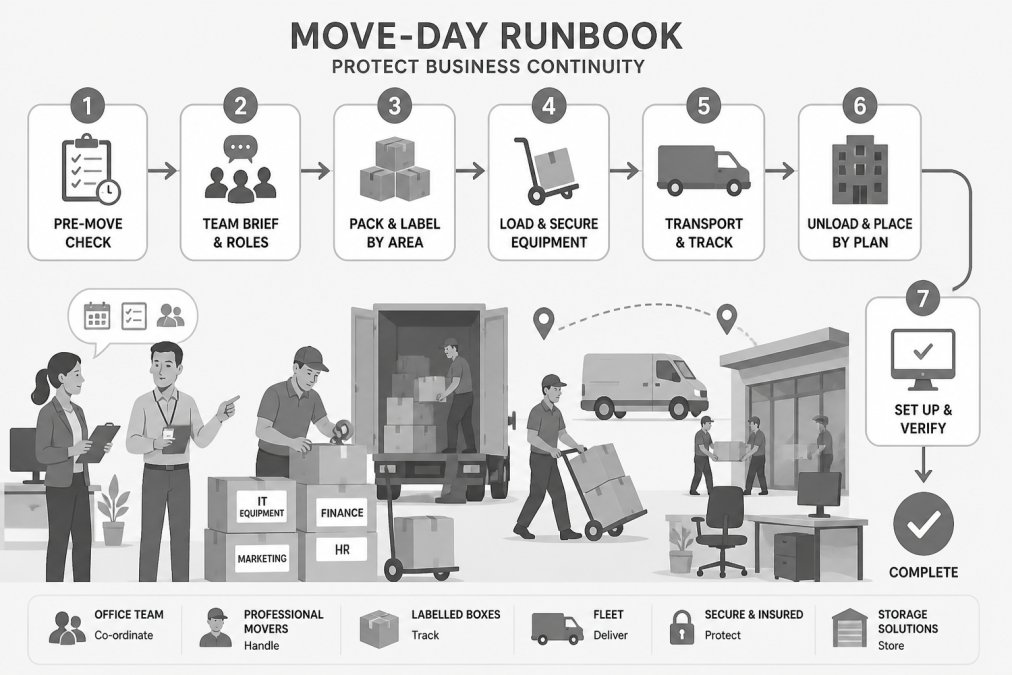
A move-day runbook is a detailed script telling every person exactly what to do and when, preventing chaos, reducing downtime, and ensuring nothing falls through the cracks.
Your runbook should cover:
Pre-move (day before):
- Confirm arrival time with movers
- Brief all staff on their roles and arrival time
- Ensure all equipment is packed and labelled
- Confirm IT support will be on-site
- Prepare the "day-one essentials" box
Moving day morning:
- Open the new office and confirm utilities are working
- Set up IT support station with tools and spare equipment
- Position a relocation team member at each office to oversee the move
- Brief staff on where to go and what to do
During the move:
- Direct movers on equipment placement using your floor plan
- Assign staff to unpack boxes and set up their workstations
- Have IT support configure computers and test connectivity
- Designate someone to handle vendor questions and last-minute issues
End of moving day:
- Test critical systems: email, internet, phones, printers
- Confirm all equipment has arrived and nothing is damaged
- Brief staff on IT support contact and emergency procedures
- Schedule a debrief meeting for the next day
Assign a move coordinator to execute the runbook, overseeing the day, making decisions, and troubleshooting problems. Without one, decisions slow down and confusion spreads.
Create a responsibility matrix showing who owns each task. Distribute it to your team before moving day. Everyone should know their role and who to ask if they have questions.
Build in buffer time. Moving day always takes longer than expected. If you schedule the move to finish at 5 p.m., you'll likely be there until 7 p.m. Plan accordingly and brief staff that flexibility may be needed.
Conclusion
Minimising office relocation downtime comes down to planning, communication, and execution. A detailed timeline prevents rushed decisions. A comprehensive checklist ensures nothing is forgotten. Clear communication keeps everyone aligned. An IT checklist prevents technical disasters. Early coordination with movers reduces surprises. Pre-staging your new office lets staff work immediately on day one. A move-day runbook turns potential chaos into controlled, efficient action.
The businesses that move smoothly are the ones that start planning 8-12 weeks in advance, assign clear ownership for every task, and test everything before staff arrive. Downtime during office relocation isn't inevitable; it's the result of skipping these steps.
Direct Couriers London Ltd has helped businesses across the UK coordinate complex office moves with minimal disruption. Our nationwide fleet, fully insured services, and instant tracking keep your equipment safe and your move on schedule. We offer same-day and next-day delivery, flexible storage options, and tailored solutions for your specific needs. Contact us today to discuss your office relocation and get a quote for seamless, reliable moving services.
Frequently Asked Questions
How far in advance should you plan an office relocation?
Begin planning 8-12 weeks before your target move date. This timeline allows you to coordinate with professional movers, notify stakeholders, arrange IT infrastructure at the new location, and prepare workstations without rushing. For larger relocations or complex IT systems, start even earlier. A structured office relocation timeline prevents last-minute decisions that increase downtime and operational risk.
What should be included in an office relocation checklist?
A comprehensive office relocation checklist covers employee communication, client and vendor notification, IT equipment audits, data backup and security measures, packing and labelling protocols, new office preparation, workstation setup, and post-move testing of systems and services. Include contingency plans for critical operations, assign clear responsibilities, and set key milestones. Breaking tasks into phases, pre-move, moving day, and post-move, ensures nothing is overlooked and downtime stays minimal.
How can a business minimise downtime during an office relocation?
Minimise downtime by planning meticulously, communicating early with all stakeholders, coordinating with professional movers, preparing your new office in advance, and testing all IT systems before staff arrive. Create a move-day runbook with clear task assignments and contingency plans for critical operations. Consider staggered moves by department, remote work options during transition, and instant tracking of equipment delivery to maintain workflow and productivity throughout the relocation.
How should you plan IT and communications for an office relocation?
Develop a detailed IT relocation checklist covering internet connectivity setup, phone line installation, network testing, data backup and restoration, cybersecurity protocols, and equipment inventory. Coordinate with your IT provider and the new building's infrastructure team weeks in advance. Test all systems in the new location before staff arrival. Ensure backup internet and phone solutions are in place for critical operations. Clear communication with employees about IT readiness prevents productivity loss and frustration on moving day.